
Making the switch from MacBook to Mac mini

The M4 Pro Mac mini has been with us now for around a month, and it’s fair to say it’s caused quite a stir.
For all the column inches telling you how good it is, there remains doubt that something this tiny can be good enough to be your main Mac and fit into a professional workflow. I know from the comments that many of you still have an M4 Pro Mac mini sitting in your cart, waiting to check out because of these doubts.
Well, I thought I’d step in to help you by telling you what’s on my M4 Pro Mac mini and get you as close up as I can and what I’ve been using it for.
M4 Pro Mac mini – making the switch
Over the past 10 days, I’ve switched full-time to working on the M4 Pro Mac mini, and in this piece, I’m going to tell you why and what it is about it that I find so compelling. I’ve refined how it fits into my workflow, what apps I have on it & what I’ve got connected to it.
And I’ve managed to make that switch from working on an M1 Max MacBook Pro without losing any productivity, which gives you an idea of how good this Mac mini M4 Pro mini is – in the real world.

I’ve written before telling you about benchmarks and have given you facts and figures, but that only tells part of the story of what this Mac mini M4 Pro is really like to use.
For context, here are the specs of the Mac mini M4 Pro that I’m talking about:
- M4 Pro (14-core CPU and 20-core GPU)
- 48GB memory (273GB/s memory bandwidth)
- 1TB SSD storage
- 10GB Ethernet
Connectivity
If you’re going to be using this every day, then I/O is going to be important to you. When Apple announced the new minis, they not only gave us plenty of I/O but also began to make Thunderbolt 5 their new standard bearer for connectivity. It’s quick – with data transfer speeds of up to 80GB/s – but it is still new, so there aren’t that many Thunderbolt 5 external SSDs out there – yet!! But I bet that in the months ahead, Thunderbolt 5 will catch on, and a load more affordable solutions will become available.

Why’s that important to you? Well, it could save you money – lots of money, that’s why! I’ve always believed that Apple’s internal storage is not only the most convenient but, until this point, has probably been the quickest to edit and work from. But they charge a stupid amount for that speed & convenience.
The entry-level M4 Pro Mac mini starts at £1399 with 24GB memory & 512GB of storage, which is enough for general, light work but not enough for a serious or even semi-serious workflow. But the moment you start to add Apple’s storage, you are paying big bucks. It’s £200 extra for 1TB, which is what I opted for £600 for 2TB, £1200 for 4TB and £2400 for 8TB, which is criminal!
There are some third-party options already out there – OWC, for instance, with their T5 Envoy SSD. As a comparison, a 2TB SSD from them will set you back $399 or 4TB for $599 – so around 50% cheaper than Apple and, by all accounts, almost as quick.
I already feel I’m going to be buying one of those in the New Year to edit from.
But there are pros and cons to both internal & external storage. With internal, if it fails, it means replacing your entire Mac – but with external, it’s easier for it to get damaged or lost. There is no right or wrong here, but cost certainly does factor into your eventual choice.
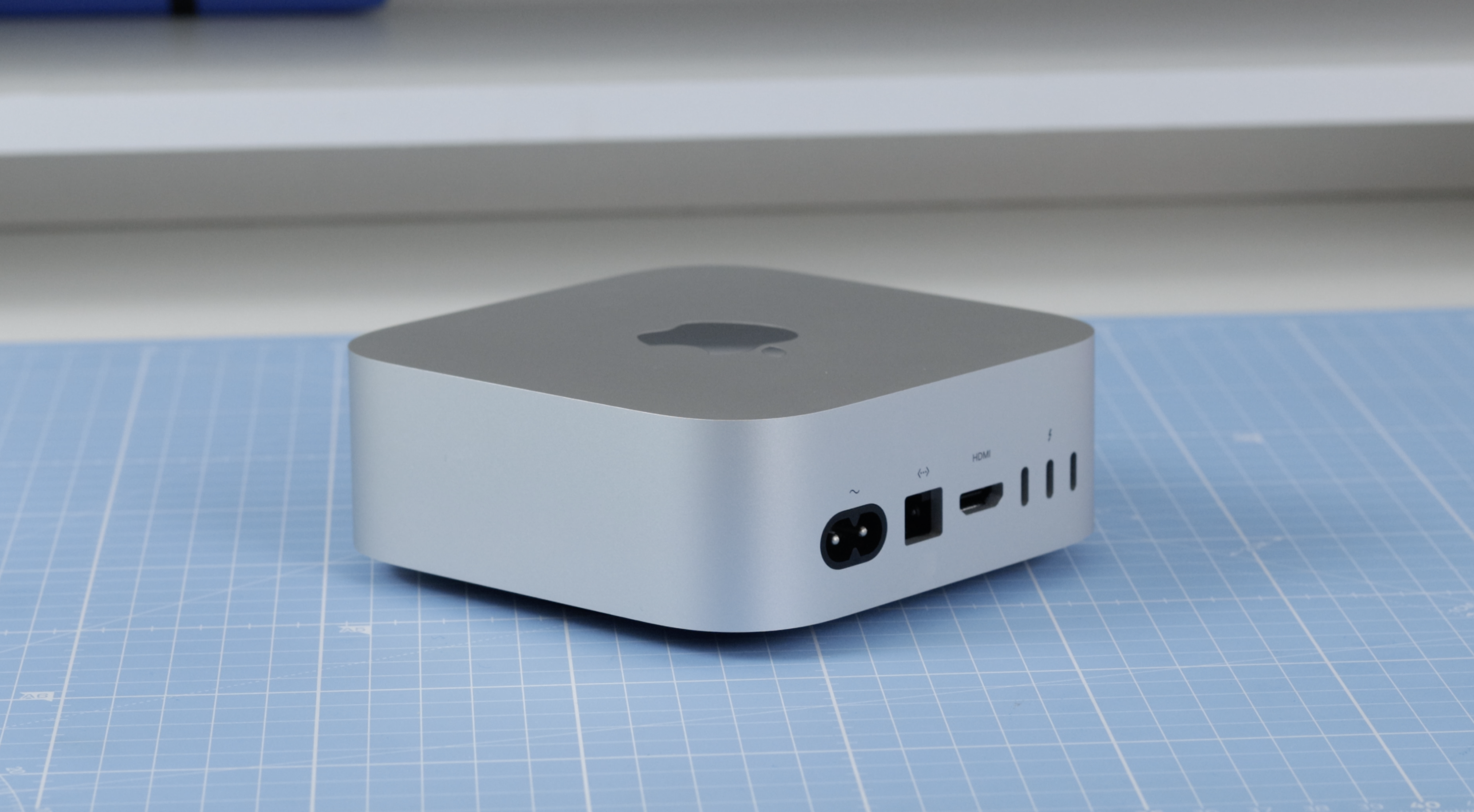
The 3 Thunderbolt 5 ports on the back of my Mac mini are all in use, though – two are leading to my Ivanky hub and the other to the Studio Display.
The 10GB Ethernet Port isn’t being used to its full potential yet, but again, I have plans for that next year as I may get a NAS. I do have the Mac mini hard wired in with an Ethernet cable – although most of the time, it’s primarily working on WiFi so that I can use Sidecar and AirDrop (which I’d be lost without) and Universal Control.
So far, I’ve not had reason to try the headphone jack as I use either my studio monitors or AirPods Max. The two USB-C ports on the front are rarely used, but when I have used them, it’s generally to charge something.

I can’t finish talking about the I/O, though, without mentioning the fact there is no SD card slot.
I’ve mentioned that in previous pieces – but I’ve been pulled up when it’s been pointed out that the SD card reader is a very specific user case scenario and that many cameras are now moving towards recording directly to SSDs. So, possibly, the days of the SD card slot are numbered anyway, and the lack of one on the M4 Pro Mac mini will become unimportant.
I already had the Studio Display, and of course, the Mac mini works perfectly with it. On my main production desk, apart from the Mac mini, I also have a few other interfaces, but with a combination of the Ivanky hub and the 3 USB-C ports on the Studio Display, I have no shortage of I/O.

Peripherals
That leads me to peripherals. I have always used Apple’s keyboards, mice and trackpads – and nothing has changed this time round. I quickly realised that I was going to start using this M4 Pro Mac mini as my main daily Mac, so I bought a new USB-C Magic mouse, trackpad and keyboard. I don’t think I have anything USB-A or lightning on my main desk now – at last, I’m USB-C all the way.

I know a lot of people rave about the MX range from Logitech – but you know what they say: if it ain’t broke, don’t fix it!
If space is an issue, then the M4 Pro Mac mini will tick boxes! I think we all had concerns that even with Apple silicon in the new tiny shape of this iteration of the Mac mini, it would have thermal issues. But, I’m happy to tell you that in my everyday work, it has behaved perfectly. It gets a little warm to the touch – but that’s it, even when rendering and exporting videos, and never once have I heard the fans.

What’s on my M4 Pro Mac mini
What we have on our Macs is a personal choice that will reflect our workflows.
But to give you some reference of what this M4 Pro Mac mini is capable of, here are some of the apps I consider essential that I have running on this M4 Pro Mac mini most days.
Obviously, for me, Final Cut is a must. It worked well on the M1 Max MacBook Pro, but it seems even smoother here. The export times are very fractionally slower – but considering this only has 20 GPU cores compared to the 32 cores of the Max chip (and only a single video encoder) it shows just how far Apple silicon has come in just a few years. Almost more important to me than the export times, though, is how Final Cut runs when I’m editing, and it is every bit as smooth on here as the MacBook. No delays, lagging or beach balls – it’s sweet!

The other video editing app I use is CapCut, which, just like Final Cut, works like a dream.

I’ve been an Adobe user for years and always install the Creative Cloud app on any of my Macs. On the Mac mini M4 Pro, I have Audition, Lightroom, Photoshop, InDesign and Acrobat running.

Everything seems to run and launch faster on this M4 Apple silicon – including these Adobe apps. Apart from Safari, I have two other browsers on here – Chrome and Edge. I’m generally a Safari boy, but I use Chrome for uploading videos as there are a couple of extensions I use that won’t run on Safari, and I use Edge only when I’m recording with RiversideFM – which I’ve found works best with Edge.
I’ve got Microsoft Word on here and a few other minor apps like MotionVFX – but they are the main apps. Oh, and Dropbox, I couldn’t live without it, and I use Smart Sync on all my Macs now, which is a huge storage saver.

The carry-away from this is simple – and surprising. Even though this is the less powerful Pro chip in real-world terms, it is performing just as quickly as my MacBook Pro. That MacBook cost £3500 and the Mac mini £2200. I know it’s not a complete Mac when you buy the M4 Pro Mac mini, but it is a decent yardstick, at least.
Switching
So why the switch, and why do I think you should finally click buy?
Assuming you have the display and other bits, it is the most affordable way to get into a high-end professional M4 Apple silicon workflow. The point of this story was to prove to you that this M4 Pro Mac mini works in real-life everyday experiences. I can do everything on here that I could on my MacBook Pro. It’s so bloody impressive!
All that, plus its tiny footprint, means my desk setup has never looked better. Cable management is easy to achieve, and my experiences will only get better next year as I add either some external SSD to it or go the NAS route.

That’s the thing, though – although it is a desktop, so an external SSD is a viable and realistic option, this thing is so portable and that has been one of the big selling points for making me switch. Over the past few weeks, I’ve routinely packed it up along with the keyboard and mouse and carried on working at home. And no matter how we all kid ourselves, taking an SSD and plugging it into another Mac is the same in reality, it never is. You may not have the same plugins or have configured your apps identically between Macs – but of course, by taking this with me, it’s seamless.
This M4 Pro Mac mini is changing the way I work – for the better. It is lighter, safer and easier to carry around than a MacBook Pro while still giving me all the power I need. My work hasn’t suffered in the slightest, and it’s cleaned up my desk and given me back some more space.
So if you’ve had an M4 Pro Mac mini sitting in your basket for the past few weeks and you’ve been undecided – hand on heart, I can promise you that you won’t be disappointed. The Mac mini is proof that miracles do happen.
Apple silicon just keeps on re-inventing what we can do on our Macs, and this Mac mini has brought productivity and creativity to even more people, which has to be a good thing.
