
Not only have I fixed some performance issues, but I’ve also stumbled upon a winning desk setup!

The M4 Pro Mac mini looks like it might be given a stay of execution after all – and I’ve saved myself £4000 as well!
Last week’s story, if you remember, was centred around the fact that I’d noticed my M4 Pro Mac mini was running a little sluggishly – not slow, but certainly not as snappy as it once felt.
It’s the kind of issue that you can’t exactly put your finger on, yet you know something’s not quite right.
Not only did I write about this problem last week, but I also made a video as well – ah, the art form of repurposing content is alive and well! The feedback and support I had from viewers of that video was staggering.
So far it’s had over 15,000 views and nearly 200 comments!
For some reason, that video caught the imagination – don’t ask me why, but it shows the level of interest in the M4 Pro Mac mini is as strong as ever.
Just like the comments I get here, many of the comments were super useful, and because I took on board some of these comments and suggestions, it seems my little M4 Pro Mac mini is running better than it has done in months.
It’s been quite the week, actually!
Not only have I had the courage to address the Mac mini’s issues, but I have also changed my desk setup again, and I seem to have stumbled upon a winning formula that I’m going to run with for the next few days to see how I get along.
In the heat of battle
As I mentioned last week, I’ve been using my M4 Pro Mac mini daily as one of my two main Macs for approaching two years, and by and large, it’s got on with its job grumble-free.
Actually, since moving to my new studio space, it’s actually become the only Mac I edit on.
But what I soon began to realise was that in that time, other than generally making sure to care for it, I’d not given it any TLC.
I guess its problem was that my Mac mini had been quite the hero and had not grumbled or complained about anything I’d asked of it, and in so doing, I had just assumed that everything was fine and dandy.
Now, to make it clear, whilst I’m a tech enthusiast, I don’t trust myself to take my Macs apart. They are central to how I work every day and earn a living, so I can’t risk screwing them up, breaking them or losing data.
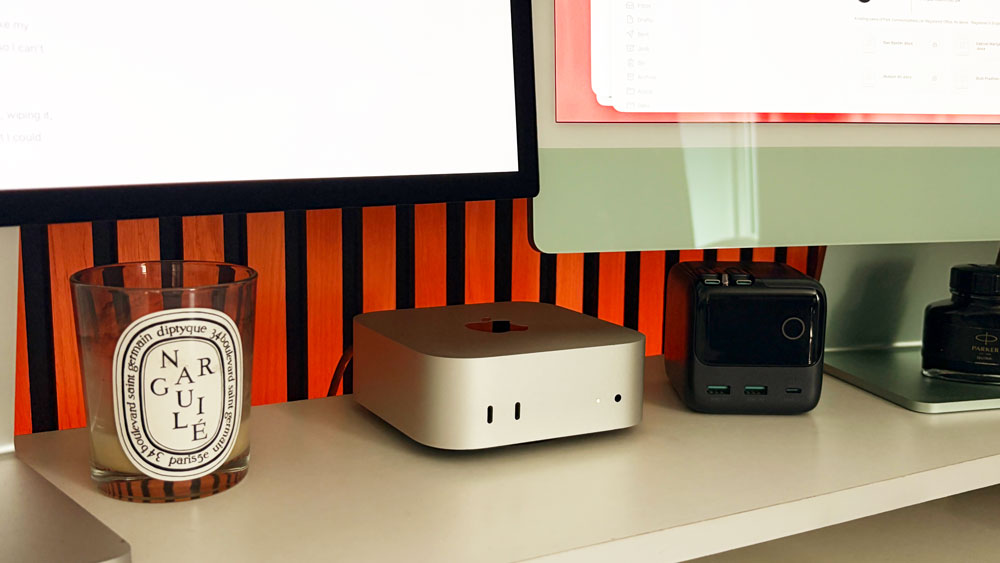
A lot of the comments I read were suggesting backing the Mac mini up, wiping it, and then doing a clean install. There were suggestions about apps that I could use, or that I should take a deep dive into the Activity Monitor and see what was going on there.
There were even suggestions I should crack open my Mac mini and take a close look at the internals – but thatwas a risk I wasn’t willing to take.
I know my limits!
But I was on a mission to get things sorted. Now I had the bit between my teeth.
My M4 Mac mini battles on
The first thing I ended up doing was to run CleanMyMac.
I can’t take credit for that idea either, though! It was a viewer that suggested it and made me realise that even though I have it installed on my Mac mini, I hadn’t run it for months – if at all!
Now anytime I mention CleanMyMac I always seem to get the haters chipping in, so let’s address this right now and nip it in the bud.
MacPaw, the company behind CleanMyMac, has no idea I’m even mentioning their app. This story is not paid for, and I couldn’t care less whether you end up buying it or not. I first used it on my 27-inch Intel iMac back in 2019, and while it may not be to everyone’s taste, it suits my needs fine. I happen to rate it!
I’ve bought many licences over the years and have generally run it on all my Macs. Whilst it might not cut it if you have a degree in computer engineering or have an avid interest in the finer workings of Macs, for us average users like myself, it does a great job.
There, with that said, now I can carry on!
It cleans, of course, removes cache, finds junk & duplicates, purges data and checks on the overall health of your Mac as well. It does it in a way that makes it easy to use and understand what’s going on, and because it’s simple to use, it means I’m likely to use it more often.
And even if you’re not a fan of CleanMyMac, you’ll have to admit, if I’m running and checking it regularly, that has to be a step in the right direction! It’s way better than blindly doing nothing.
As you know, I was convinced that thermal throttling was part of the issue due to a pretty warm studio and our record-breaking summer that we’re experiencing in the UK this year.
Many comments suggested I should be checking my Activity Monitor more frequently. I’ve since looked at it and whilst I understand some of what’s going on in there, much of it is over my head.

CleanMyMac – and again I must stress, this is not an advert for it, gives you a version of the Activity Monitor in your menu bar in colourful, easy-to-comprehend graphics. It offers enoughdata to be comprehensive but not too much that you get swamped and lost looking at it.
It shows me the memory pressure and CPU load, and it even shows me the physical connection speed between my Mac and my router. Why I hadn’t thought of running it before, I have no idea.

Whereas I’d attempted to clear cache and history from Safari in a rather crude manner, this tool does it far better & more comprehensively by flushing the DNS cache. That, coupled with freeing up my purgeable space, seems to have made a massive difference in the time it’s taking for web pages to load, for example.
I know Purgeable space on a Mac is supposed to be managed automatically by macOS, but it seems that mine needed a bit of a reboot. I’m still mainly a Safari user, and most of the sites that I use daily I open via favourites that I have saved to Safari’s home page. I guess it’s possible that although that’s convenient, it might not be the best practice – something else I’ll have to look into.
CleanMyMac found nearly 30GB of junk, and overall it’s now running so much better!
But I was a brave little Mac user and went one step further!
An opening
As I mentioned, there were a lot of comments saying that I should open up my Mac mini and clear the dust that would inevitably have built up over those two years. Don’t forget that until recent days I’d always left the Mac mini switched on 24/7.
So today, just before writing this story, I watched a video about how to remove the base plate on a Mac mini and with my heart in my mouth I decided to have a look inside for myself!
I was pooping myself, but I proceeded with caution, took my time, and after a few sweaty minutes, it popped off without too much fuss!
Where I’d expected it to be clogged full of dust, it was actually remarkably clean in there. Whilst it was open, I did use an air duster to give it a decent clean-out though. Possibly I could have gone one stage further and removed the next plate that’s secured with hex screws – but that was enough for me.
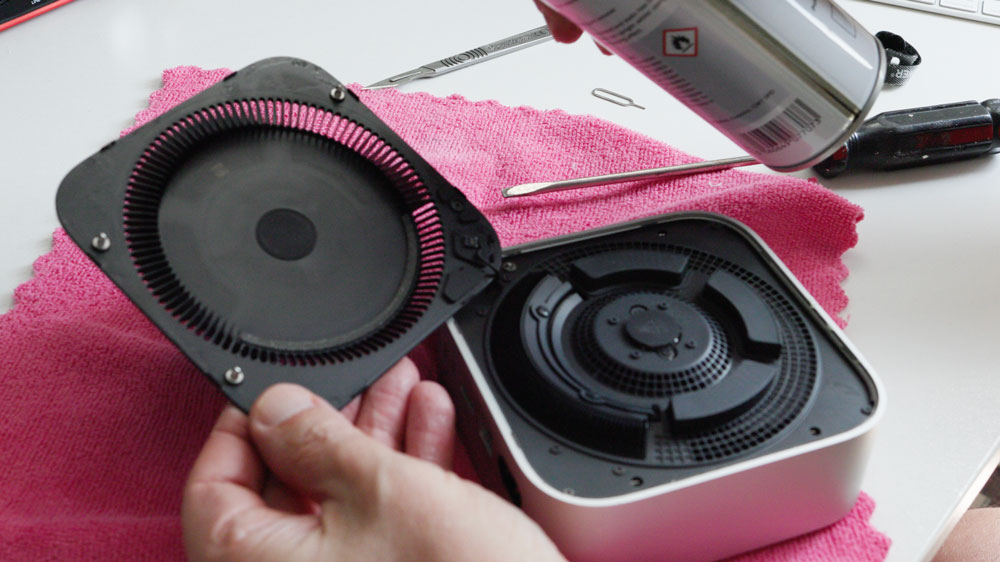
Even though I’d taken loads of time and care whilst opening it up, I still breathed a huge sigh of relief when my Mac mini chimed and booted up as normal once it was all back together again!
So what with running CleanMyMac, making sure it wasn’t clogged up with dust inside and turning it off at night, my Mac mini has now had a bleated spring clean and seems to be running better than it has in a very long while.
It just goes to show how far a little love goes! And with a new, better-optimised macOS just around the corner, the Mac mini’s future looks good for now.
A new beginning
Another question I’d raised last week was about using an iMac as a second display – which has led me to a nifty little desk setup that I’m currently playing with to see how I like it.
My M4 iMac has generally sat on my second desk in the studio, and as much as I love using it, it has often sat there unused for days at a time.
Again, after going through the comments, I realised I’d forgotten that the answer to my problem about using the iMac as a kind of second display was staring me right in the face.
In macOS, there is the Screen Mirror function. It’s like Sidecar for the iPad. You can either choose to mirror or extend your main display.

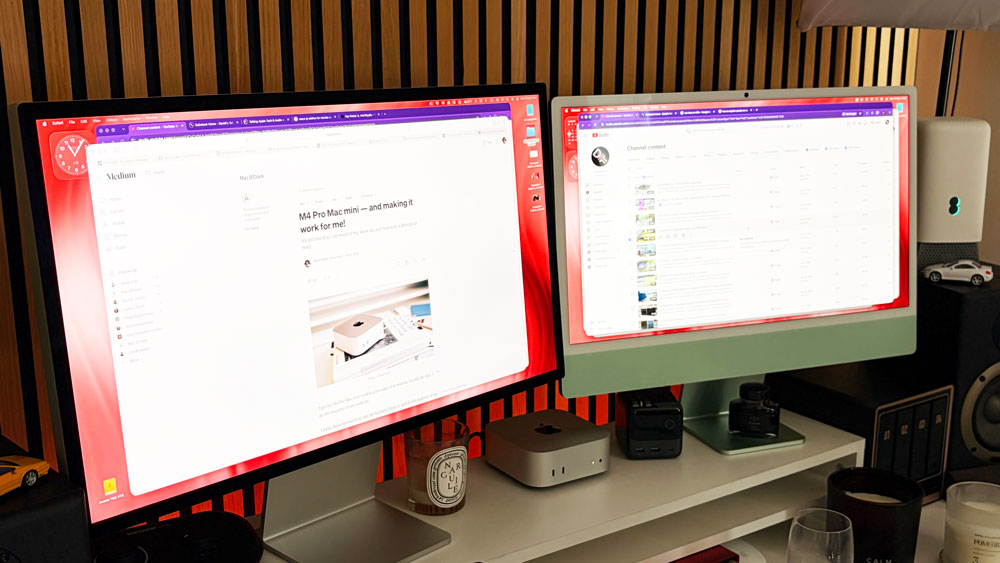
So, I’ve moved the iMac to my main desk, and it’s now currently sitting alongside my Studio Display and the Mac mini and what quickly dawned on me was that this actually gives me the best of both worlds.
When I’m working on the Mac mini and need a second display, I pop it into extend mode! But when I’m happy working on a single display on the mini, then I have a second Mac sitting there to check email or Safari on, or, as I’m doing right now, use it totally independently, as a Mac in its own right to write this piece on in Ulysses.
Universal Control is the final part of the macOS puzzle that makes all this possible and so far, I must say, it looks like a pretty tasty solution!
The iMac sits at about the same height as the Studio Display and is very nearly as bright (500nits versus 600nits), and of course it’s a Mac Retina display, which means it’s gorgeous and sharp.
I’ll admit that when in the extended mode, the resolution isn’t quite as sharp as the Mac’s native display, but for use as a second monitor where I’m often just referencing things or grabbing files to drag & drop, it’s not that bad at all.
And if you were wondering, yes, I did try connecting both Macs via a USB-C cable, but it made no difference to its clarity. I’ve yet to try an HDMI to USB-C cable, though; possibly that would help.
And don’t forget, it also means that I’m now using this iMac all the time rather than it sitting gathering dust. I’m not yet saying it’s a keeper, but my first impressions after nearly a week of this setup are solid.
It may not be perfect, and I know it isn’t a genuine second display, but it’s a solution that I’m going to run with for the next week or so to see how it and I fare!
If Lady Luck treats me well, I’d invest in another Studio Display in a heartbeat, but, for now, like replacing the Mac mini with a Mac Studio, it can wait.
Isn’t it odd – the more time I spend with Macs and the Mac ecosystem, the more excited I get about the possibilities that it offers. When you scratch the surface, there’s always something to learn or a tool you’ve overlooked.
A week ago, I’d never have thought of using Screen Mirroring for the Macs – proving a week in tech is a very long time! It’s also proof positive that you can teach an old dog new tricks!
My M4 Mac mini is running much better, and the iMac is getting used. All in all, not a bad week’s work!
